In the contemporary educational landscape, computer science is rapidly shifting from an optional elective to a foundational literacy alongside reading, writing, and mathematics. Yet for many homeschooling parents, the prospect of teaching coding evokes understandable apprehension. If you do not write software professionally—or if your own computer skills are limited to word processing and email—the thought of teaching algorithms, syntax, and object-oriented programming can feel utterly overwhelming.
The secret that seasoned technology educators understand is that computer science is not fundamentally about computers. At its core, computer science is the study of computational thinking—the rigorous mental art of breaking complex problems down into manageable components, identifying patterns, designing logical algorithms, and methodically troubleshooting unexpected errors.
When approached developmentally, homeschooling offers the ideal environment for teaching coding. Unbound by the rigid 45-minute computer lab rotations of traditional schools, home educated students can immerse themselves in deep, self-directed passion projects—building video games, programming microcontrollers, automating science experiments, and creating production-grade software that rivals collegiate portfolios.
The Four Pillars of Computational Thinking
Before introducing any software language, home educators should cultivate the four foundational mental habits defined by the International Society for Technology in Education (ISTE) and the Computer Science Teachers Association (CSTA):
- Decomposition: Breaking down a complex, daunting task into small, bite-sized, solvable sub-problems. In daily life, this is how a child recipes a complex dinner or outlines an essay.
- Pattern Recognition: Observing similarities, recurring trends, and shared attributes among different problems to reuse previously discovered solutions.
- Abstraction: Filtering out irrelevant background details to focus strictly on the essential operational variables.
- Algorithm Design: Crafting an ordered, step-by-step sequence of unambiguous instructions designed to achieve a repeatable, predictable outcome.
By viewing coding through this lens, parents realize that baking cookies, choreographing a dance routine, or organizing a book collection are all forms of foundational pre-programming logic.
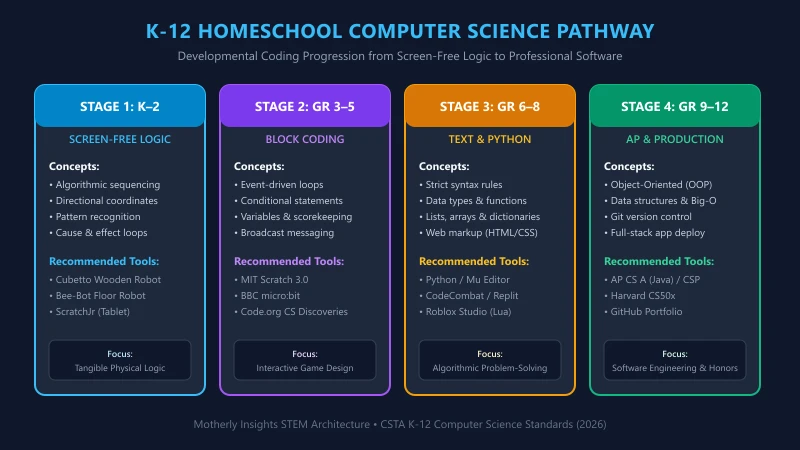
Stage 1: Screen-Free Logic & Tangible Computing (Grades K–2)
The most counterintuitive principle of early computer science education is that young children do not need screens to learn programming. In kindergarten through second grade, introducing early learners to tablets and keyboards often creates passive media consumption rather than active analytical construction.
Instead, early coding should be physical, tactile, and kinesthetic.
Core Stage 1 Curricula & Tools
- Cubetto Wooden Robot (Primo Toys): A smiling wooden robot powered by screen-free coding blocks. Children place colorful tactile tiles into a wooden control board to send Cubetto on storybook map adventures, learning directional algorithms (forward, left, right, function subroutine) without a single pixel.
- Bee-Bot Floor Robot: A durable, bee-shaped robot with simple directional buttons on its back. Children program up to 40 sequential steps across alphabet grids, math mats, and neighborhood maps, reinforcing spatial reasoning and forward-planning.
- Board Games for Pre-Coding Logic: Award-winning board games like Robot Turtles (ThinkFun) and Code Master teach conditional branching, subroutines, and debugging protocols around the dining room table.
- ScratchJr (Tablet Optional): For families ready for gentle digital exploration, MIT’s ScratchJr utilizes large, visual icon blocks that snap together horizontally to animate interactive stories without requiring reading fluency.
Stage 2: Block-Based Creative Computing (Grades 3–5)
Around third grade, as children develop robust reading fluency and operational math reasoning, they are ready to transition to visual, block-based programming environments.
The greatest hurdle for novice programmers is not logic; it is the unforgiving tyranny of syntax errors. If an eight-year-old misplaces a single semicolon, quotation mark, or parenthesis in a traditional text language, the entire program crashes with an obscure compiler error. Block-based coding solves this pedagogical dilemma by presenting programming logic as interlocking, color-coded jigsaw puzzle pieces. If two commands are incompatible, they simply will not snap together.
Core Stage 2 Curricula & Tools
1. MIT Scratch 3.0 (Free, Open-Source)
Developed by Dr. Mitchel Resnick at the MIT Media Lab, Scratch is the uncontested gold standard for elementary creative computing:
- Pedagogical Power: Scratch teaches variables, loops, conditional logic (if-then-else), Cartesian coordinates (x-y grid positioning), and event-driven triggers through game design, digital art, and musical composition.
- Curriculum Spines: Pair the free Scratch platform with Creative Computing (Harvard Graduate School of Education free curriculum) or Super Scratch Programming Adventure! (No Starch Press).
2. BBC micro:bit & Physical Computing
To prevent screen fatigue, the BBC micro:bit brings block coding into the physical world. A pocket-sized programmable computer featuring an LED light display, accelerometer, compass, Bluetooth, and buttons:
- Real-World Projects: Children program their micro:bit to become a digital step-counter, a soil moisture sensor for family house plants, an automated burglar alarm for bedroom doors, or a multiplayer radio communication tag game.
- Software: Programs seamlessly using Microsoft MakeCode drag-and-drop blocks.
3. Code.org CS Fundamentals
- Structure: Highly structured, self-paced interactive puzzles featuring popular characters (Minecraft, Star Wars, Angry Birds) that guide students through loops, functions, and nested conditionals.
- Best For: Independent, low-prep learning requiring zero parent grading.
Stage 3: The Text-Based Transition & Python Mastery (Grades 6–8)
By sixth or seventh grade, many students hit the expressive limits of block-based environments. Complex mathematical formulas, extensive data structures, and advanced game physics become tedious to manipulate with mouse clicks. The middle school years represent the pivotal bridge to text-based programming.
Why Python Is the Premier Transitional Language
Among modern software engineering languages, Python is uniquely suited for middle and early high school learners:
- Clean, Human-Readable Syntax: Python replaces confusing braces and semicolons with clean whitespace indentation, reading almost like plain English prose.
- Universal Professional Power: Python is not a “toy” learning language. It is one of the most widely used production languages on earth, dominating artificial intelligence, machine learning, data science, web backends, and scientific research.
Core Stage 3 Curricula & Platforms
| Curriculum / Platform | Learning Format | Primary Focus | Best Age Band | Cost |
|---|---|---|---|---|
| Python for Kids (No Starch Press) | Illustrated Textbook | Fundamental syntax, turtle graphics, Tkinter game design | Grades 6–9 | Book purchase |
| CodeCombat | Gamified RPG | Typed Python / JavaScript to control hero characters through dungeon puzzles | Grades 5–8 | Free core / Subscription |
| Replit & Python Crash Course | Cloud IDE & Project Book | Real-world software engineering, data visualization, Pygame | Grades 7–10 | Free / Book purchase |
| Roblox Studio (Lua Scripting) | 3D Game Engine | Object-oriented mechanics, client-server networking, monetization | Grades 6–10 | Free engine |
Stage 4: High School Honors, AP Computer Science & Production Engineering (Grades 9–12)
In high school, computer science can fulfill graduation math, foreign language (in many states), or lab science distribution requirements, while building an elite transcript for STEM college admissions.
Navigating the Two AP Computer Science Courses
The College Board offers two distinct Advanced Placement exams in computer science:
-
AP Computer Science Principles (CSP):
- Scope: A broad, multidisciplinary survey course exploring the societal impact of computing, cybersecurity, the architecture of the internet, big data, algorithms, and creative programming.
- Recommended Curricula: Code.org CS Principles (free, endorsed syllabus), Khan Academy AP CSP, or edX Beauty and Joy of Computing (UC Berkeley).
- Optimal Timing: 9th or 10th grade.
-
AP Computer Science A (CSA):
- Scope: A college-level, rigorous introduction to object-oriented software development taught exclusively in Java. Covers classes, objects, method overloading, polymorphism, inheritance, 2D arrays, recursion, and sorting/searching algorithms.
- Recommended Curricula: Edhesive / Amazon Future Engineer, CSAwesome (interactive online textbook), or Georgia Tech’s introductory Java sequence.
- Optimal Timing: 11th or 12th grade.
Collegiate-Level Self-Taught Alternatives: Harvard CS50x
For motivated, gifted homeschoolers seeking world-class computer science without traditional high school test prep, Harvard University’s CS50x (Introduction to Computer Science) on edX is freely accessible. Taught by Professor David J. Malan, this legendary course immerses students in C, Python, SQL, HTML, CSS, JavaScript, and algorithmic memory management, accompanied by demanding problem sets that push students to true software engineering competence.
How Non-Tech Parents Can Mentor Coding: The Art of “Rubber Duck Debugging”
The most significant barrier to homeschool computer science is parental fear: “What do I do when my child’s code doesn’t work, and I have no idea how to fix it?”
Professional software engineers spend over 50% of their working hours debugging code that does not run. A computer science mentor is not an oracle of answers; they are a facilitator of investigative grit.
The Three-Step Mentoring Protocol
- Rubber Duck Debugging: In software companies, engineers keep a small rubber duck on their desk. When stuck, they must explain their code line-by-line out loud to the duck. Encourage your child to read their code aloud to you: “What did you tell the computer to do on line 14? What did you expect to happen? What actually happened?” In 80% of cases, articulating the discrepancy aloud reveals the bug.
- Read the Error Message Closely: Teach your child not to panic when an error occurs. Computer error logs explicitly state the line number and the precise nature of the failure (e.g., ‘IndexError: list index out of range’).
- Model Technical Search Literacy: Demonstrate how software engineers find solutions. Show your student how to copy the exact error message into a search engine, consult official documentation, or read curated threads on Stack Overflow.
By stepping back and allowing your child to experience the profound, triumphant satisfaction of fixing their own bugs, you cultivate the greatest gift of a classical education: intellectual independence, resilient patience, and the confidence to master complex modern systems.
Disclaimer: This post is for informational and educational purposes only, accurate to the best of our knowledge at publication. It does not constitute advice. We do not guarantee accuracy or completeness and accept no liability for any decisions or losses resulting from reliance on this content.